Prosperity uses its own application to submit contracting compared to all the other carriers that use SureLC (Surancebay).
So, if you are at 105% or higher and you have an agency partner who is starting in your team, they need to submit the contracting using your invitation link.
Our new brokers always start at 100% contract. However, there may be instances when you bring an experienced agent to FFL and start them off at a contract level that is higher than 100%, may be – 105% or 110% or 115%, etc. So, you want to make sure that you have all those invitation links generated.
So, if you are at 105% or higher and you have an agency partner who is starting in your team, they need to submit the contracting using your invitation link.
Our new brokers always start at 100% contract. However, there may be instances when you bring an experienced agent to FFL and start them off at a contract level that is higher than 100%, may be – 105% or 110% or 115%, etc. So, you want to make sure that you have all those invitation links generated.
You have to do this step-
1. only once
2. only if you are at 105% or higher
3. Only if you are building an agency
1. only once
2. only if you are at 105% or higher
3. Only if you are building an agency
Login to Prosperity Agent Portal-
https://insuranceadmin.com/
and follow the below steps-

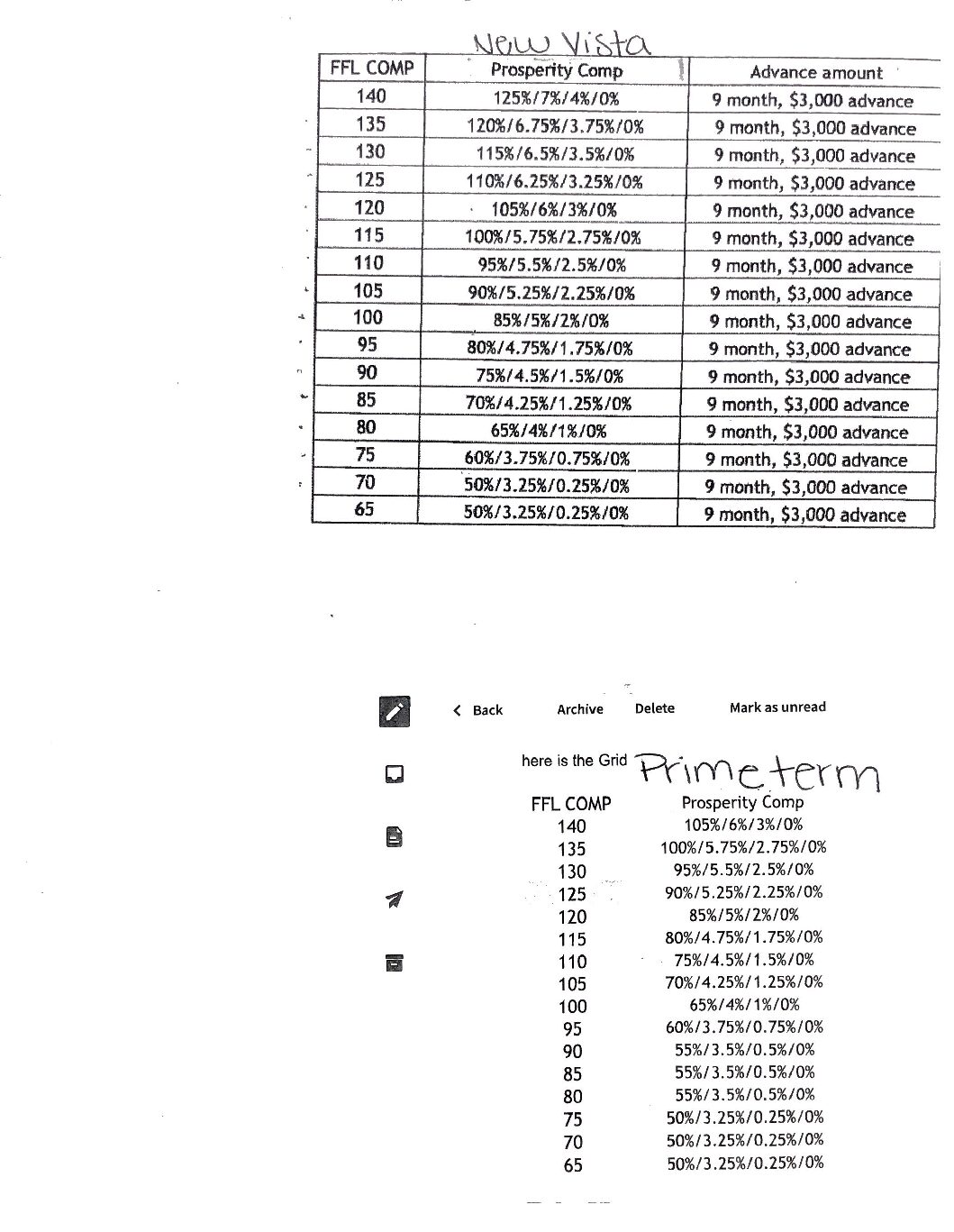
Final Expense – New Vista Product

If you do not see the level, choose “Custom Level” and add: 85/5/2/0
TERM – Prime Term Product


The registration link for 100% contract would now be available at the top as shown below.

Repeat the above steps for 105%, 110%, 115% and 120% as per the below sheet-
Once generated, copy each link and email them in one email to jay.patwa@gmail.com as below-
105% – https://insuranceadmin.com/contract/WWPCMT
110% – https://insuranceadmin.com/contract/ABCXYZ
115% – https://insuranceadmin.com/contract/WWPCMR
120% – https://insuranceadmin.com/contract/WWPCMQ
 and then select